A custom software studio · Rock Hill & Charlotte
Let’s get your business where you’re trying to go.
You already know what you want this place to become — and what you’d rather not be doing at eleven at night. LINK builds custom systems that move you toward the first and quietly handle the second: pricing, orders, invoices, the follow-ups you keep meaning to send. Built around how you already work, run for you after launch, and cheaper than hiring someone for it.
Built around you · Run for you · You’ll see it finished before you pay
Where it takes you
Pointed at what you actually care about
We start with where you want this to be in a year, then build the shortest path to it. If a slow week is really a follow-up problem, that's what we fix first.
What it costs
Less than the hire you keep putting off
One monthly number instead of a salary, payroll tax, and training — and it doesn't call out, quit, or need managing.
How it's made
Built for you, and built well
No templates and no per-seat software you're renting forever. Custom workflows shaped around how you already work, designed to a standard you'd show off.
How this works
We build it, we launch it, and we keep it running — so your week bends back toward the part only you can do.
The work
Finished builds, not promises.
Every build below is real, live, and clickable — a working site with the system running behind it. Tap any one and use it like a customer would, then open the owner view and run it like the owner.
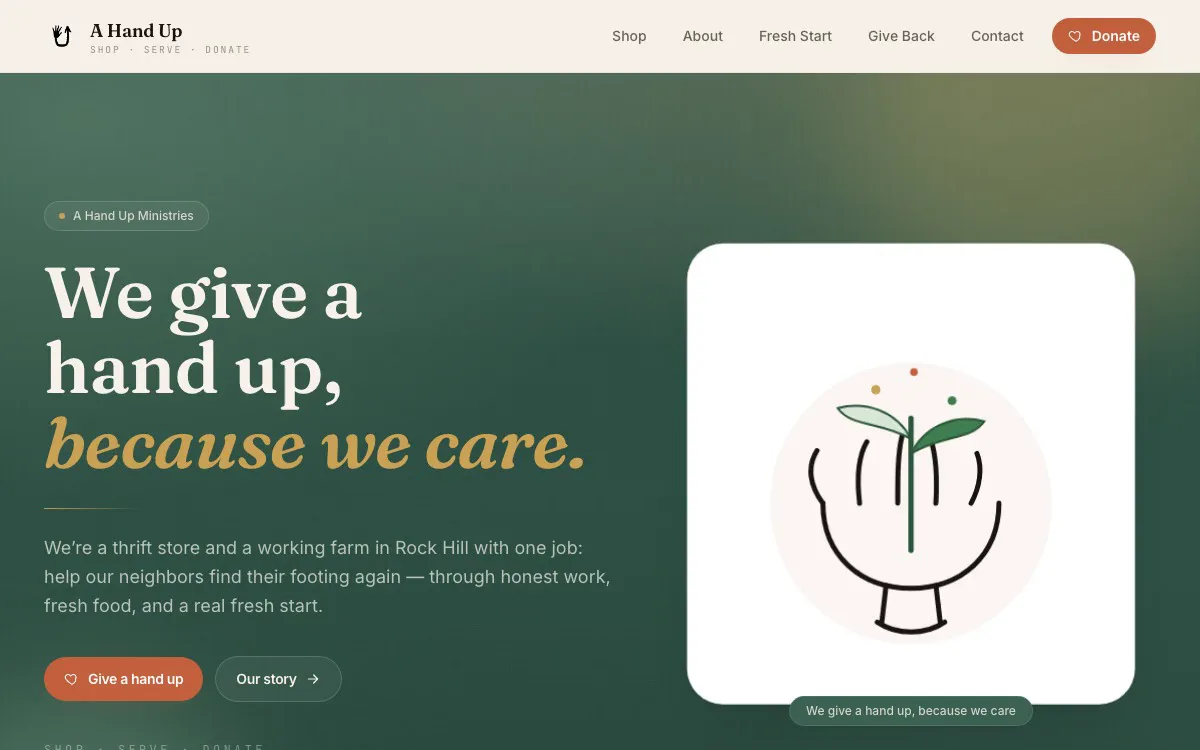
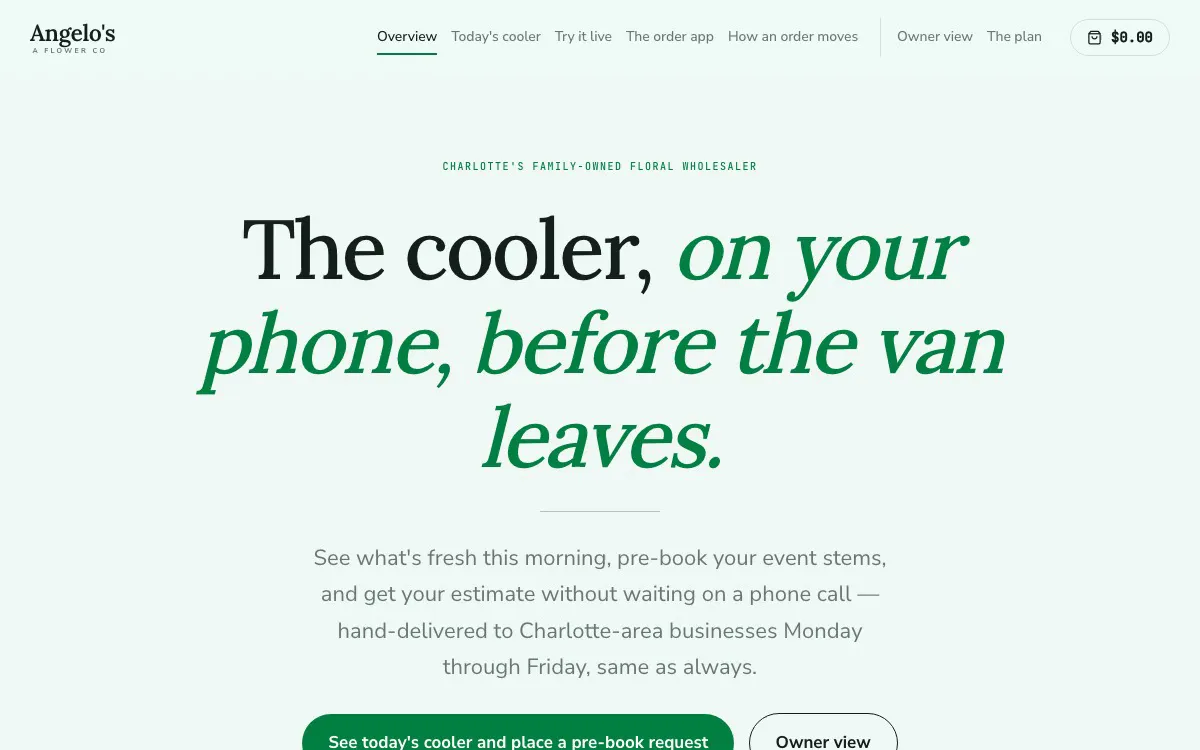
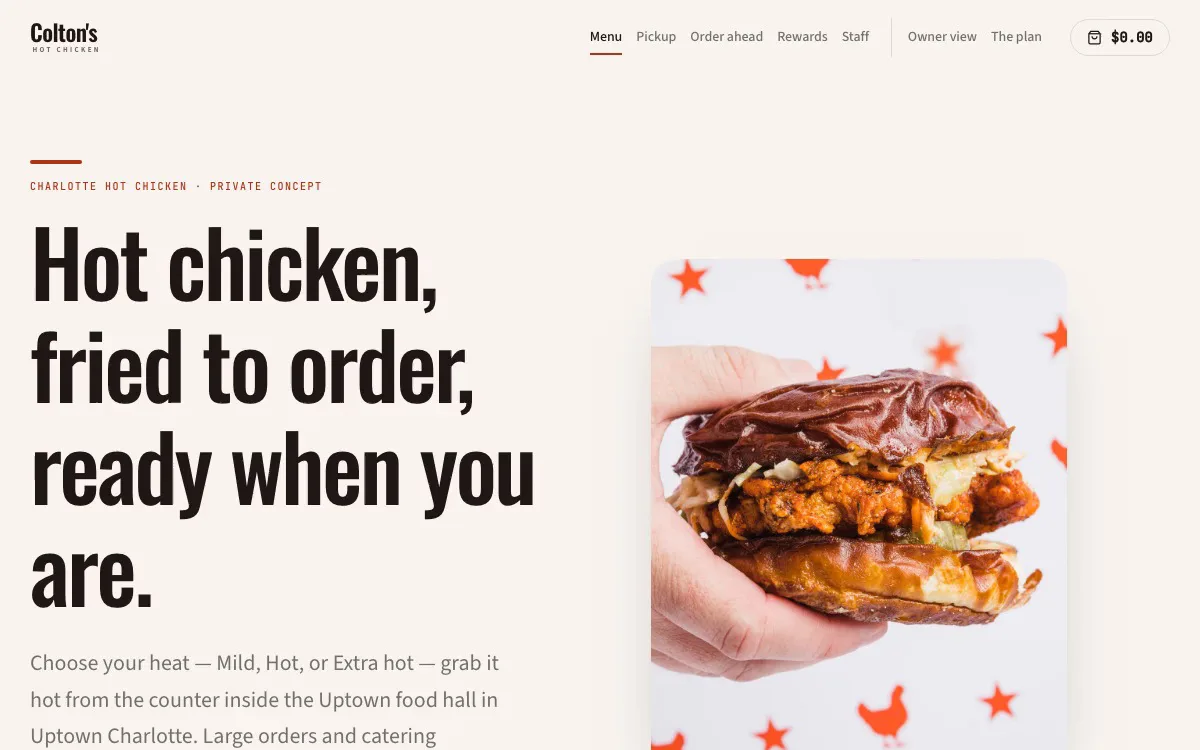
Want to see what your business could look like? Ask, and we’ll build the mockup.
Inside a build
A system isn’t one screen. It’s everyone’s screen.
Guests order. Servers clock in and work their section. The kitchen runs tickets. The owner reads the night. One system underneath, and nobody has to look at a screen that isn't theirs.
Pick a seat
The customer at table 12
Orders from the table without an app, an account, or waiting to flag someone down.
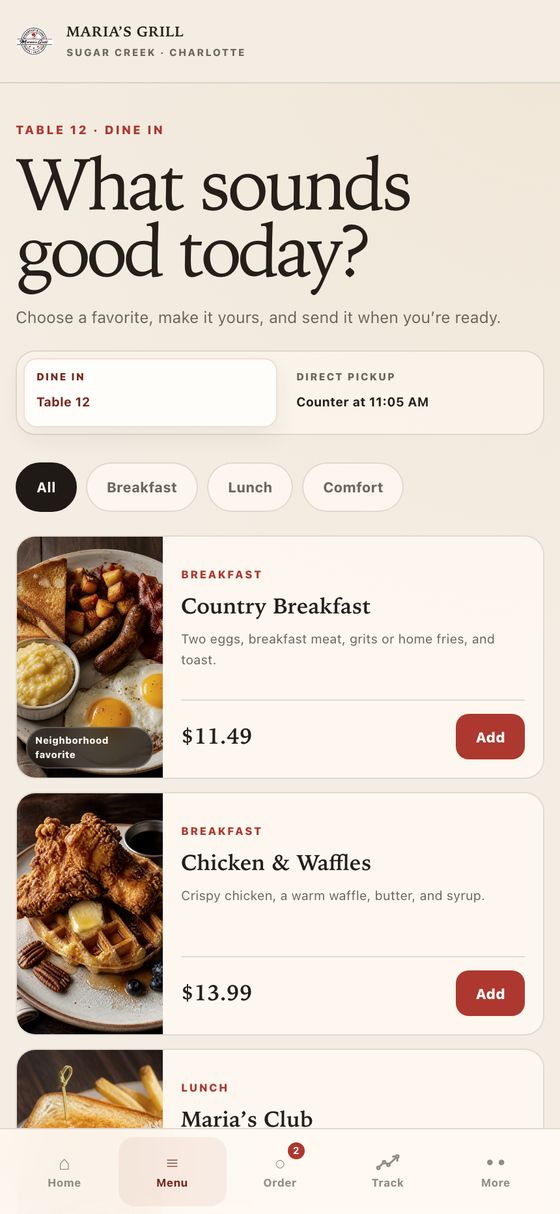
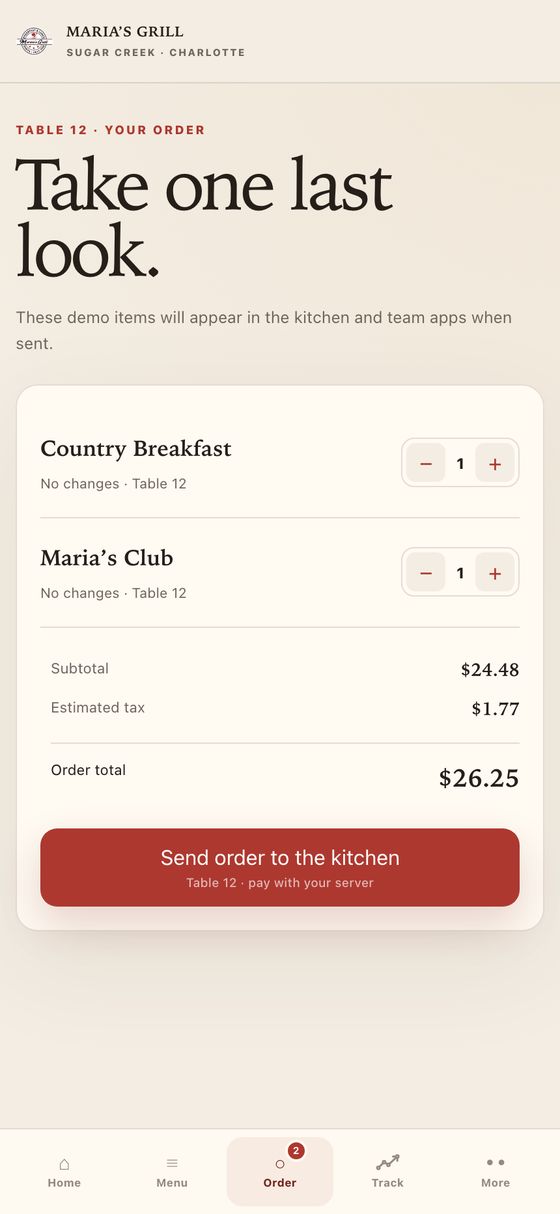
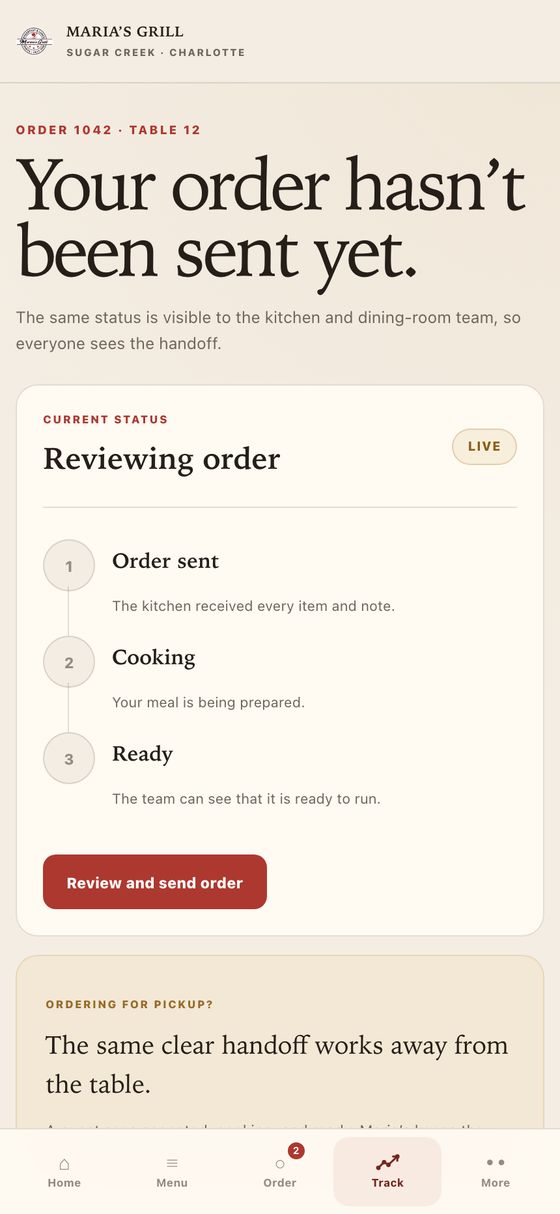
Frames from a working demo build. Every order, name and figure on screen is sample data. Open the demo and tap through it yourself ↗
How it works
Backwards, on purpose.
Getting you somewhere new only works if it doesn't cost you the time you're trying to win back. So we do the building before you commit, and the running after — you never carry the middle.
We study your business
Your hours, your menu, your customers, what you're known for — before we ever talk about software.
We build the mockup first
You see your actual future website, finished and working, with your name on it. It costs you nothing to look.
You decide
Love it, and it goes live. Don't, and you walk away owing nothing. The work speaks or it doesn't.
Then we run it
Ordering, booking, follow-ups, dashboards — we keep it working and keep building toward whatever you're aiming at next.
The menu
Everything we can take off your hands.
Start with the website. Then hand over whatever else is eating your week — each of these is something we already build and already run, explained the way we'd say it across the counter.
Not sure what your business needs? Ask LINK below — it’ll tell you honestly.
By kind of business
What your build actually includes.
The menu above is what we can build. This is what it looks like for your kind of shop — concrete, not a feature list.
Restaurants & food
Menus that you change yourself, ordering that doesn't cost commission, and hours that are right at 2am.
- Your full menu, priced, with photos — updated by you in seconds
- Order or reserve from a phone, straight to you, no marketplace cut
- Multiple locations with their own hours, even when they differ
- Specials and events that reach the people who already love you
- Your story and your press, told properly
Built it for: an eight-shop pizza company · a two-kitchen restaurant · a neighborhood grill
Retail & smoke shops
A live shelf customers can check before they drive over, and a way to reach them after they leave.
- A live menu of what's actually in stock this morning
- New arrivals posted the day they land, not whenever someone remembers
- Reserve-and-pay-in-store — no card processing headaches
- Product details and lab results where customers can find them
- A customer list you own, not one rented from a directory
Built it for: two independent smoke shops — one drive-through, one open 24 hours
Service & trades
Quote requests that reach your phone, and follow-up that happens whether or not you remember.
- Request-a-quote that texts you the moment it lands
- Service areas and what you actually do, in plain language
- Before-and-after work, organized so it sells for you
- Automatic follow-up on every quote you send
- Reviews collected without you having to ask twice
Built it for: a handyman and home-repair service
Nonprofits & ministries
Giving that works on the first try, and the custom tools nobody else will build you.
- Donation flow that works on a phone in one tap
- Your mission told honestly, without stock-photo language
- Ways to volunteer, donate goods, or get help — all clear
- Custom staff tools for the work nothing off-the-shelf handles
- Everything editable by whoever is in the office that day
Built it for: A Hand Up — live client, in use daily
Not on this list? Tell us what you do — we’ve built a pricing scanner for a thrift store. The list isn’t the limit.
Your part
Almost none of it is on you.
The worry we hear most is that this becomes one more thing to manage. It doesn't — that's the entire point. Here is genuinely everything we need from you.
And after launch?
You text us. “New special,” “we’re closed Monday,” “change that photo” — it’s usually live the same week, often the same day. No tickets, no change orders, no hourly billing. That’s what the monthly is for.
- You send us the basicsYour logo if you have one, photos, menu or service list, hours. If you don't have good photos, we'll tell you exactly what to shoot on your phone.
- We build itAbout a week. You don't have to do anything during this part — no meetings, no homework, no decisions by committee.
- You look at it and say what's wrongReal feedback, not polite feedback. We change it until it's right before anything goes live.
- We launch itWe handle the domain, the email records, and every technical piece. Nothing about your existing email or phone changes.
The platform
Behind every build: LINK.
The website is the front door. LINK is the operator behind it — AI software we shape around your business, that keeps working after you lock up.
It lives on your phone
LINK is an app on the owner's phone, not a login you forget. Text it, or call it — an actual phone call — and it gets things done.
Follow-up runs itself
Missed calls, DMs, and form fills get answered and tracked, so leads stop dying in your inbox while you work.
Content ships without you
Raw clips and notes become posts, captions, and a schedule — reviewed by you, published on time.
You see everything
Who owes what, who opened your site, what needs you today — one dashboard, kept current automatically.
Want to see it running for real?
Open the working demo and tap through it yourself — or Angelo will show you live: his screen, your questions, fifteen minutes.
The price
One honest number.
No proposal theater. Most businesses fit one simple structure, and you already saw the work before spending a dollar of it.
Bigger builds — multiple locations, custom tools, deeper systems — get their own quote, in plain language, before anything starts. And the mockup is free either way.
And launch isn’t the end of it. The monthly is a continuing relationship — you keep adding features, refreshing the design, and shaping the system around whatever your business does next. What goes live in week one is just where it starts.
And most shops already pay more than this across subscriptions that don’t talk to each other — the booking tool, the review tool, the email tool, the scheduler. This replaces the stack with one number and one person to call.
Want it on paper? The whole offer, in one PDF ↗
Most builds
- Your finished website, live on your domain
- LINK running follow-up, content, and dashboards
- Changes and new features every month — just ask
- A builder who answers his phone
or email angelo@angiegrowth.com
Talk to LINK
Meet the software.
This is LINK — the same AI that runs inside every build. Tell it about your business and it'll tell you, honestly, what we'd build for it.
It won’t pressure you and it doesn’t take payments — worst case, you leave with a clearer picture of your own business. When you’re ready for a person, Angelo is one email away.
LINK
Ask about the work
Straight answers
The questions owners actually ask.
No sales language — the same answers you'd get across the counter.
What does it cost to see my mockup?
Nothing. We build your finished website first — your name, your business, working pages — and show it to you. If you don't want it, that's the end, no bill. That's the whole point of doing it backwards.
What do I actually get for $1,000?
Your finished website, live on your own domain, built custom for your business — not a template with your logo dropped in. Menus, hours, ordering or booking, the story of your shop, all of it working on day one.
And what does the $500 a month cover?
Everything after launch: hosting, changes whenever you want them, new features as your business grows, and LINK — the AI that answers missed messages, follows up with customers, drafts your social posts, and keeps your dashboard current. Think of it as a tech department that costs less than one shift a week. And it doesn't end there — new features, design updates, whatever your business needs next, month after month.
I already have a website. Is this still for me?
Usually, yes — most owners we meet have a site that's a few years old, hard to update, and doing nothing for them. We'll build the mockup of what it could be, and you compare them side by side. The old site keeps running until you decide.
How long does it take?
The mockup usually exists within days. Going live after you say yes is typically a week or two, depending on what we're building. Changes after launch are often same-week — you text, it gets done.
What is the AI actually doing for a shop like mine?
Whatever we program it to do — that's the real answer. It answers the DM that comes in while you're with a customer, texts back the missed call, reminds the person who asked about a cake last Tuesday, drafts the week's posts from your photos, runs the automations behind your business, and we can build it new abilities whenever you need them. You approve anything that matters. It isn't magic — but it feels like it.
Who do I actually talk to?
Angelo. He designs it, builds it, and answers the email himself. No account managers, no ticket queue — the person who built your software is the person who picks up.
The builder
Built by Angelo.
LINK is designed and built hands-on by Angelo Williford in Rock Hill, South Carolina — one builder, real businesses, and software that gets shaped around each one. When you email, he’s the one who answers. When something needs fixing, it’s usually fixed the same week.